

Windows 1.0
Windows 1.0 was the first major version of the Microsoft Windows series of Operating Systems, released on November 20, 1985 for US and to European nations in May of 1986. It marked a significant step in the evolution of Personal Computers (PCs). It wasn't a full-fledged operating system; it was only a graphical shell that ran on top of MS-DOS (mentioned in Other Notable Versions of Windows, check it out after reading this). This approach introduced a user-friendly interface with icons and windows, compared to the command-line DOS-interface, which made computers more accessible to a wider audience.

Date released: November 20, 1985
End of Support: December 31, 2001
Last release: Windows 1.04 in April 1987
Succeeded by: Windows 2.0 (released 1987)
Codename: Interface Manager
Developed by: Microsoft Corporation
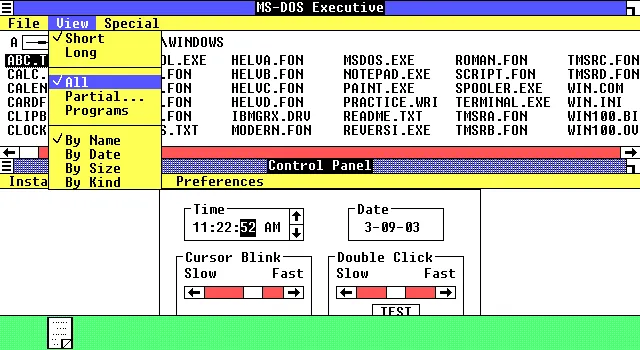
Development began when Bill Gates saw a demonstration of a similar piece of software, Visi On at COMDEX in 1982. Windows 1.0 runs on MS-DOS, as a 16-bit shell program known as MS-DOS Executive, and provides an environment which can run graphical programs designed for Windows as well as MS-DOS compatible programs. It included multi-tasking, the use of the mouse, and various built-in programs like Calculator, Paint, and Notepad, which can still be found today. It does not, however, allow its windows to overlap, rather the windows are tiled. Windows 1.0 had 4 releases 1.01 through 1.04, adding support for more languages or newer hardware.
The system received lukewarm reviews; critics raised concerns about not fulfilling expectations, its compatibility with very little software, and its performance issues, while it also received positive responses to Microsoft's early presentations and support from a number of hardware manufacturers and software developers. Its last release was 1.04, and it was succeeded by Windows 2.0, which was released in December 1987. Microsoft ended its support for Windows 1.0 on December 31, 2001, making it the longest-supported out of all versions of Windows.
Development
Microsoft showed its desire to develop a graphical user interface (GUI) as early as 1981. Development of Windows began after Bill Gates, co-founder of Microsoft as well as developer of Windows, saw a demonstration at COMDEX 1982 of VisiCorp's Visi On, a GUI software suite for IBM PC compatible computers. A year later, Microsoft learned that Apple's own GUI software—also bit-mapped, and based in part on research from Xerox PARC—was much more advanced. Microsoft decided it needed to differentiate its own offering. In August 1983, Gates recruited Scott A. McGregor, one of the key developers behind PARC's original windowing system, to be the developer team lead for Windows 1.0.
Microsoft first demonstrated a window manager to the press in September 1983. The demonstration featured a user interface similar to Multiplan and other contemporary Microsoft applications with a command bar at the bottom of the screen. It also showed multiple application windows in both overlapping and tiled arrangements. This user interface concept was soon reworked to only support tiled windows and to change the Multiplan-like command bar into a menu bar under each window's title bar. The redesigned environment ultimately had its public debut at Fall COMDEX 1983 in November 1983. Initially requiring 192 KB of RAM and two floppy disk drives, Microsoft described the software as a device driver for MS-DOS 2.0. By supporting cooperative multitasking in tiled windows when using well-behaved applications that only used DOS system calls and permitting non-well-behaved applications to run in a full screen, Windows differed from both Visi On and Apple Computer's Lisa by immediately offering many applications. Unlike Visi On, Windows developers did not need to use Unix to develop IBM PC applications; Microsoft planned to encourage other companies, including competitors, to develop programs for Windows by not requiring a Microsoft user interface in their applications. Manufacturers of MS-DOS computers such as Compaq, Zenith, and DEC promised to provide support, as did software companies such as Ashton-Tate and Lotus. After previewing Windows, BYTE magazine stated in December 1983 that it "seems to offer remarkable openness, reconfigurability, and transportability as well as modest hardware requirements and pricing … Barring a surprise product introduction from another company, Microsoft Windows will be the first large-scale test of the desktop metaphor in the hands of its intended users".
IBM was notably absent from Microsoft's announcement, and the corporation rejected Windows in favor of creating IBM TopView. By late 1984, the press reported a "War of the Windows" between Windows, TopView, and Digital Research's Graphics Environment Manager (GEM). Whether corporate customers wanted any graphical interface was unclear—Jim Manzi of Lotus wondered during a 1987 joint interview with Gates, "why did it have to be so messy, the whole transition process that we're putting the world through?"—but from early in Windows's history, Gates viewed Windows as Microsoft's future. He told InfoWorld magazine in April 1984 that "our strategies and energies as a company are totally committed to Windows, in the same way that we're committed to operating-system kernels like MS-DOS and Xenix. We're also saying that only applications that take advantage of Windows will be competitive in the long run". Computerworld wrote in 1987 that "Gates has pushed [Windows] almost fanatically for years".
Steve Ballmer replaced McGregor after he left the team in January 1985. Microsoft promised in November 1983 to ship Windows by April 1984, then May 1984, but due to various design modifications, its release date was repeatedly delayed. During its development and before its windowing system was developed, it was briefly referred to by the codename "Interface Manager". De-emphasizing multitasking, the company stated that Windows' purpose, unlike that of TopView, was to "turn the computer into a graphics-rich environment" while using less memory. After Microsoft persuaded IBM that the latter needed a GUI, the two companies announced in April 1987 the introduction of OS/2 and its graphical OS/2 Presentation Manager, which were supposed to ultimately replace both MS-DOS and Windows.
Release versions
On November 20, 1985, the first retail release, Windows 1.01, was released in the United States at a cost of US$99 (equivalent to about $280.00 in 2023). In May 1986, the next release, 1.02, was published mainly for the European market, also introducing non-English versions of Windows 1.0. The version 1.03, released in August 1986, included enhancements that made it consistent with the international release like drivers for non-U.S. keyboards and additional screen and printer drivers, and superseded both version 1.01 in the US and version 1.02 in Europe. Version 1.04, released in April 1987, added support for the new IBM PS/2 computers, although no support for PS/2 mice or new VGA graphics modes was provided. However, on May 27, 1987, an OEM version was released by IBM, which added VGA support, PS/2 mouse support, MCGA support, and support for the 8514/A display driver. IBM released this version on three 3.5-inch 720k floppies and offered it as part of their "Personal Publishing System" and "Collegiate Kit" bundles. Microsoft ended its support for Windows 1.0 on December 31, 2001, making it the longest-supported version out of all versions of Windows.
Features
Windows 1.0 was built on the MS-DOS kernel, while it runs as a 16-bit shell program known as the MS-DOS Executive, and it offers limited multitasking of existing MS-DOS programs and concentrates on creating an interaction paradigm (cf. message loop), an execution model and a stable API for native programs for the future. The operating environment supports the use of a mouse, which allows users to perform click-and-drag operations. Contrary to modern Windows operating systems, the mouse button had to be kept pressed to display the selected menu.
Opening .exe files in the MS-DOS Executive would open an application window. Windows 1.0 also includes programs such as the Calculator, Paint (then known as Paintbrush), Notepad, Write (Now known as WordPad), Terminal, and Clock. Paint only supports monochrome graphics. The operating environment also has the Cardfile manager, a Clipboard, and a Print Spooler program. Initially, Puzzle and Chess were supposed to appear as playable video games, although Microsoft scrapped the idea; instead, it introduced Reversi as a commercially published video game. It was included in Windows 1.0 as a built-in application, and it relies on mouse control. The operating environment also introduced the Control Panel, which was used to configure the features of Windows 1.0. The operating environment does not allow overlapping windows, and instead, the windows are tiled. When a program gets minimized, its icon would appear on a horizontal line at the bottom of the screen, which resembles the modern-day Windows taskbar.
It also consists of three dynamic-link libraries, which are located as files in
the system under the names KERNEL.EXE, USER.EXE, and GDI.EXE. The Windows
1.0 SDK contains debugging versions of these files, which can be used to replace
the corresponding files on the setup disks.: 13, 200 The setup program combines
multiple system files into one, so that Windows boots faster. Using the
debugging KERNEL.EXE provided by the Windows 1.0 SDK one can create a "slow
boot" version of Windows, where the files are separate. Windows 1.0 includes a
kernel, which performs functions such as task handling, memory management, and
input and output of files, while the two other dynamic-link libraries are the
user interface and Graphics Device Interface. The operating environment could
also move the program code and data segments in memory, to allow programs to
share code and data that are located in dynamic-link libraries. Windows 1.0
implemented the use of code segment swapping.
Version 1.02 introduced drivers for European keyboards, as well as screen and print drivers. The last Windows 1.0 release, 1.04, introduced support for IBM PS/2 computers. Due to Microsoft's extensive support for backward compatibility, it is not only possible to execute Windows 1.0 binary programs on current versions of Windows to a large extent but also to recompile their source code into an equally functional "modern" application with limited modifications.
In March 2022, it was discovered that the operating environment also includes an easter egg that lists the developers who worked on the operating environment along with a message that says "Congrats!".
System requirements
The official system requirements for Windows 1.0 include the following:
- an 8088 processor
- 256 KB of memory for Windows 1.01-1.02 and 320 KB of memory for Windows 1.03-1.04
- Two double-sided floppy disk drives or a hard disk
- CGA, HGC, or EGA adapters (VGA is supported on Windows 1.04)
- MS-DOS 2.0 through MS-DOS 3.10 for Windows 1.01-1.02, MS-DOS 2.0 through MS-DOS 3.20 for Windows 1.03-1.04
Besides the minimum system requirements, Microsoft has also published a note in which it recommended additional memory when using multiple applications or DOS 3.3.
Reception
Windows 1.0 was released to lukewarm and mixed reviews. Critics considered the platform to have future potential but felt that Windows 1.0 had not fulfilled expectations and that it could not compete with Apple's GUI operating system. It was also criticized for its slowness and compatibility with very little software. Reviews criticized its demanding system requirements, especially noting the poor performance experienced when running multiple applications at once, and that Windows encouraged the use of a mouse for navigation, a relatively new concept at the time. The New York Times compared the performance of Windows on a system with 512 KB of RAM to "pouring molasses in the Arctic" and that its design was inflexible for keyboard users due to its dependency on a mouse-oriented interface. In conclusion, the Times felt that the poor performance, lack of dedicated software, uncertain compatibility with DOS programs, and the lack of tutorials for new users made DOS-based software such as Borland Sidekick (which could provide a similar assortment of accessories and multitasking functionality) more desirable for most PC users.
According to Computerworld magazine, Windows 1.0 received 500,000 sales from its release in 1985 up to April 1987. In retrospect, Windows 1.0 was regarded as a flop by contemporary technology publications, who, however, still acknowledged its overall importance to the history of the Windows line. Describing Windows development in the early 1980s as "a joke in the industry", Chris Pratley of Microsoft wrote in 2004 that "Windows 1.0 ... was sort of a demo". Nathaniel Borenstein (who went on to develop the MIME standards) and his IT team at Carnegie Mellon University were also critical of Windows when it was first presented to them by a group of Microsoft representatives. Underestimating the future impact of the platform, he believed that in comparison to an in-house window manager, "these guys came in with this pathetic and naïve system. We just knew they were never going to accomplish anything." The Verge considered the poor reception towards the release of Windows 8 in 2012 as a parallel to Microsoft's struggles with early versions of Windows. In a similar fashion to Windows 1.0 running atop MS-DOS as a layer, Windows 8 offered a new type of interface and software geared towards an emerging form of human interface device on PCs, in this case, a touchscreen, running atop the legacy Windows shell used by previous versions.
A mock version of Windows 1.0 was created by Microsoft as an app for Windows 10 as part of a tie-in with the Netflix show Stranger Things, aligned with the release of the show's third season, which takes place during 1985.
User Interface
The GUI consisted of icons which could be clicked on to open files and programs. The desktop contained icons, windows in which programs ran, dropdown menus, and a line at the bottom that displayed running programs, similar to the modern-day taskbar on Windows. The Program Manager was unsophisticated, consisiting of a list of files that referred to a location on the disk. These could be programs, pictures, text files or other types of files. To change the wallpaper, system files had to be edited, which was very dangerous. Buttons were always in a pill shape, except for the control buttons like maximize and minimize, which were squares. Multitasking is cooperative, which means programs could not run at the same time. Instead, they take turns using the processor. Windows could not overlap, instead being tiled.